
// TL;DR
A private Bugcrowd invite, one in-scope test site, and a set of provided credentials. It turned into eleven vulnerabilities in a single session — a missing password policy, a profile-image endpoint that let me brute-force logins, and a run of stored and reflected XSS where the app allowed HTML at certain endpoints but had strong filters in place. The interesting part wasn’t finding the injection points, it was defeating the filters: breaking out of an anchor’s href attribute into a JavaScript context, slipping a blocked scheme past a keyword blacklist with HTML-entity encoding, and turning the app’s own tag-stripping into a patch bypass. All reported, all rewarded.
Hello friends — here’s an interesting finding I want to share.
The invite
About two months ago I received a private invitation on Bugcrowd, and the next day I started looking for bugs. There was only one target in scope — a testing site — and they provided me some credentials.
I can’t disclose the site name, so let’s assume https://redacted.com.
First of all, I logged in to the site with the provided credentials and inspected it for around fifteen minutes, just trying to understand how it worked. After that I started looking for bugs, and found multiple — mostly stored XSS. That day I found a total of eleven vulnerabilities. I reported them and received a bounty on each report, so I’m not disclosing the bounties. I’m also not sharing all of my findings here, just some of them.
First recon: password & auth
At the beginning, I tried to change my default password and successfully changed it to 1 — which was the first bug: there’s no password policy.
After that I checked some session management and rate-limiting issues and found nothing. Then I just copied my profile pic URL and opened it in incognito / a private window. The site prompted basic authentication to log in, which allowed me to brute-force the users’ login — that was my second finding.
After playing with the application for a while, I realised there were great chances of XSS.
Stored XSS via HTML file upload
So I found my first simple stored XSS by uploading an HTML file — there’s a feature that allows users to upload an HTML file and share it with others (team members).
Stored XSS in the report feature
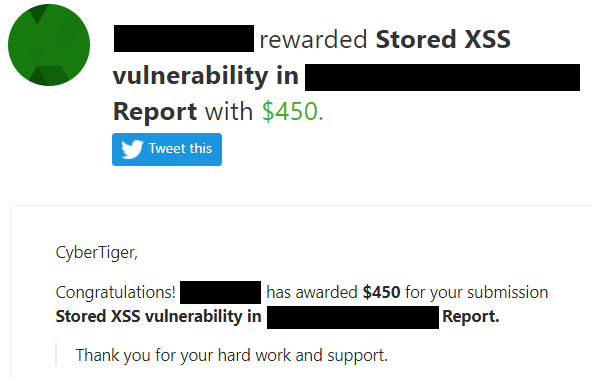
Then I found my second stored XSS in the report feature, which let me create a report with HTML, resulting in stored XSS.
Reflected XSS: breaking out of href
Then I found my third one — a reflected XSS in a parameter (href).
Wait… it was not easy. I spent time on each vulnerability, because the application allowed HTML at certain endpoints but there were strong filters in place.
There was an href parameter in a URL, so I just changed its value to http://evil.com and it showed a link in the response, reflected inside an anchor tag in the href attribute:
<a href="reflection">Link</a>
So I changed the value to javascript:prompt(0), jaVascript://evil.com, and other protocols — but none were allowed; only a URL with http was allowed. Then I tried to break the href param with double quotes like this:
http://evil.com/">
…but it wasn’t possible to break the href attribute either. At first I was thinking there was no XSS. Then I again carefully inspected the source code and the DOM with Ctrl+U and Ctrl+Shift+I, and saw that the keyword was also reflecting inside JavaScript. So without wasting a single minute, I entered the payload '-confirm(3)-' in the href param value like this:
href=http://evil.com'-confirm(3)-'
…and boom, XSS fired in the browser.
I spent approximately two to three hours finding the above vulnerabilities. After that I took a little break and thought about stopping and getting some rest.
After a few minutes I changed my mind — don’t stop, keep going — so I turned my laptop back on and started looking for XSS in multiple places, and found six more. Now I’m sharing the three most exclusive findings.
Stored XSS in web link (+ the bypass)
There was a feature that allows users to add a URL, which other users can view (like a website URL on the profile page). So I entered javascript:prompt(4) in the URL field and the site showed an error, “URL must start with http or https” — so it wasn’t allowed to start the URL with any other protocol.
So I entered http://evil.com in the URL field, clicked Submit, then intercepted the request with Burp and changed the URL from http://evil.com to javascript:prompt(3), and it was successful. Then I saw that the payload became xxxxxxxxx:prompt(3) — meaning javascript was replaced with xxxxxxxxx.
So I repeated the steps and changed the URL to jaVasCript:prompt(4) — nothing happened with the uppercase. After trying some payloads with encoding I figured out the payload: jaVascript:confirm(3).
The steps were:
- Entered the valid URL
http://evil.comin the URL field and clicked Submit. - Intercepted the request with Burp and changed
http://evil.comtojaVascript:confirm(3). - Forwarded the request and turned off the intercept.
- Clicked the link — XSS successfully executed.
Bypass (after they fixed it). I repeated the previous steps and changed the URL to:
http://evil.com/"><script>alert(3)
…and saw the URL in the response as:
http://evil.com/">alert(3)
…meaning it was stripping the <script> tag. So the final payload became:
javascript<script>:prompt(document.domain)
…and it was successful, bypassing the previous patch. The app removes <script> from the middle of the string, which reassembles a valid javascript: scheme.

Stored XSS in messages
The application had different roles for users, high to low privilege. For example:
- Instructor (high privilege / admin)
- Student (low privilege)
- and more.
There was a message feature that allows students to message instructors and instructors to message students, with HTML. So I sent a message with multiple payloads like:
<a href="javascript:alert(1)">Click Me</a>
<a href="http://evil.com" onevent=XSS>Click Me</a>
…from a student (low) to an instructor (high) — but nothing happened, because the javascript scheme, <script> tag, and the event handler all got filtered. I tried almost everything, from encoding to a bunch of payloads, and was thinking it wasn’t vulnerable anymore.
After that, I repeated the same steps and sent the message with the payload <a href="javascript:alert(1)">Click Me</a> from the instructor to the student account — and it was successful. So an instructor can perform an XSS attack on students by sending a message. The report was rated P3.

Stored XSS in user email
This is my special finding, which was rated P2. I found a stored XSS in a user’s email through which a student (low) can perform a Cross-Site Scripting attack on an instructor (high).
An instructor (high) can view all team members, including a student (low), by name and email, and can edit the role and remove members in settings.
At that time I thought: previously I found an XSS with a payload in the name field, and it got triggered in the admin account. So I changed the student account name to something evil with the payload — but nothing happened, due to proper input sanitisation. The name field wasn’t vulnerable anymore.
Then I was thinking it’s not vulnerable, because the only way to XSS was by changing the name. I asked myself: what about the email? If we change the email to something evil, maybe it’s possible to XSS with the email.
Whenever I entered special characters in the email field, the site said it’s not allowed. So I just entered hacker@mail.com, clicked Save, intercepted the request with Burp, and changed it to:
hacker@mail.com"> ontest="test"
…and it was changed successfully. I quickly checked the student email from the instructor account and saw hacker@mail.com" ontest="test" in the email, and in the source code:
<a href="mailto:hacker@mail.com" ontest="test">hacker@mail.com" ontest="test"</a>
So I quickly repeated the steps and changed the email to hacker@mail.com" onmouseover="prompt(3)", and checked the response from the instructor account — onmouseover=prompt(3) was replaced with xxxxxxxx=prompt(3).
I repeated the steps multiple times and tried a number of payloads with different encodings, but nothing worked.
After that, I took a deep breath, drank some water, then traced my steps by following the previous step, and got an idea: the application strips an angle bracket. So the final payload became:
hacker@mail.com" <onmouseover>="prompt(1)"
…and when I moved the mouse cursor over the student email from the instructor account to check the code, XSS fired.

Takeaways
- Map every reflection: Always check the reflection everywhere, in the source code and in the DOM. Note the total number of reflections and where each one is reflecting in the response
- Treat client-side validation as a suggestion: Don’t worry if you get errors like “not allowed”. Just enter the allowed characters and submit the request, then intercept it with Burp and modify it.
- Test across privilege levels: Check with different privilege levels, because sometimes the application doesn’t sanitise user input on the higher privilege.
- A substring filter can be a weapon: Inspect carefully what is reflecting and what characters are being stripped, note the response, and craft the payload accordingly — a filter that strips a substring from the middle of your input can reassemble a valid payload.
Thanks for reading. I hope you liked this sharing. Have a nice day — happy hacking!

Leave a Reply