
// TL;DR
A finding that came from a stray thought rather than a methodical hunt. Zoho Mail — like most webmail — routes images in emails through an image proxy so the real source server never sees you. I noticed the proxy would fetch and serve whatever you pointed its source parameter at, including an SVG — and because SVG can carry script, pointing it at my own xss.svg executed JavaScript in the Zoho Mail origin. Reported, triaged within minutes, and rewarded a $200 bounty.
How the idea came up
This one wasn’t a planned hunt. I was busy with exams and had only opened my laptop to email some work to a friend. After sending it, I went through my other inboxes — Yahoo, Zoho, Outlook — reading mail, nothing important.
I was about to close the laptop when a thought just clicked: “there’s no image proxy on Zoho Mail — that’d be a bug.” I have no idea why it surfaced. So I went back, opened a random email with images in it, and checked — and there was an image proxy. Slightly deflating. But I copied the image address and opened it in a new tab anyway, and that’s where the actual bug was waiting.
What an image proxy does
When an email contains an image, loading it directly from the sender’s server leaks information about you — your IP, when you opened the mail, your client. To prevent that, webmail services route images through their own image proxy: the proxy fetches the image server-side and serves it to you from the mail provider’s domain, so the original host only ever talks to the proxy.
Zoho’s proxy URL looked like this:
https://mail.zoho.com/zm/ImageProxy?source=https://site.com/pic.jpg&uid=...&mode=mailview
The source parameter is the image the proxy goes and fetches.
The finding: SVG through the proxy
The first thing I tried was simply changing source to a different site’s image:
...ImageProxy?source=https://anothersite.com/pic.jpg&...
Zoho happily fetched and displayed it. So the proxy would retrieve arbitrary URLs, not just images from the original email. That alone was interesting — but the real question was what kind of file it would serve back.
I pointed it at an SVG instead of a JPG:
...ImageProxy?source=https://anothersite.com/pic.svg&...
Zoho displayed that too. So I pointed it at my own SVG crafted to carry a script — mysite.com/xss.svg — and boom: XSS executed, running in the context of mail.zoho.com.

Why SVG is the key
The whole bug hinges on the difference between a JPG and an SVG.
A JPEG or PNG is just pixel data — harmless to render. SVG is different: it’s XML, and it can contain <script>. When a browser renders an SVG as an actual document (rather than as a flat <img>), that script runs. So if a proxy that’s meant to serve images will fetch and serve an SVG with a content type the browser treats as a renderable document, it becomes an XSS delivery mechanism — the attacker’s script executes under the mail provider’s trusted domain.
That’s the trap: “image proxy” sounds safe because images are inert, but SVG is an image format that is also a scriptable document. Treating all “images” as equally harmless is the mistake.
The fix
The remediation is about how the proxy serves what it fetches:
- Don’t serve SVG as a renderable document. Force a non-executable content type (e.g. serve as
image/pngafter rasterising, or withContent-Typethat the browser won’t execute) and sendContent-Disposition: attachment/X-Content-Type-Options: nosniffso it can’t be rendered inline as active content. - Restrict what the proxy will fetch and return — validate that the response is a genuine raster image, not arbitrary XML/SVG.
- Serve proxied content from a sandboxed, cookieless domain, so that even if something does render, it isn’t in the trusted
mail.zoho.comorigin.
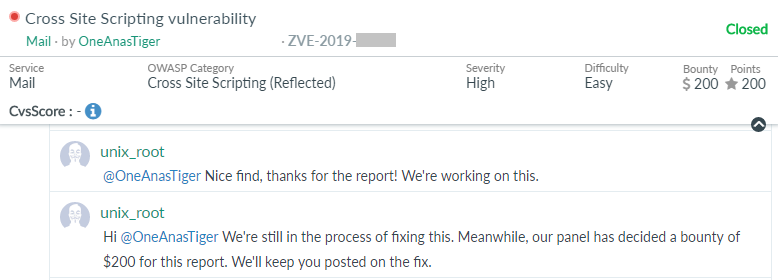
So, I reported the issue quickly to Zoho and they triaged my report very fast after some minutes and rewarded me a $200 bounty.
Takeaways
- “Image” is not a synonym for “safe.” SVG is an image and a scriptable XML document. Any feature that accepts, stores, or proxies “images” should be tested with an SVG payload specifically.
- Image proxies are a rich target. They fetch URLs server-side and serve the result from a trusted origin — test what else they’ll fetch (SSRF angle) and what content types they’ll hand back (XSS angle).
- Follow the stray thought. This bug started as an idle “I bet there’s no image proxy” as I was closing the laptop. The hunch was wrong, but chasing it anyway led straight to the real issue. Curiosity beats methodology more often than it should.
- Check the content type, not just the URL. The proxy serving a different site was mildly interesting; the proxy serving a different file type that the browser executes is the actual vulnerability.
Thanks for reading — hope you liked this one. Have a nice day, and happy hacking!

Leave a Reply