
// TL;DR
Tesla’s login had a brute-force protection that, on its face, is a good thing — too many wrong passwords and the account locks. The catch was how it locked: instead of a temporary cooldown, it forced the user to reset their password to regain access. That turns a defensive feature into a weapon — an attacker who knows (or enumerates) a victim’s email can deliberately trip the lockout and force a password reset on an account that isn’t theirs. This is an intentional design choice with a real downside, which is exactly why it’s worth writing up.
The behaviour
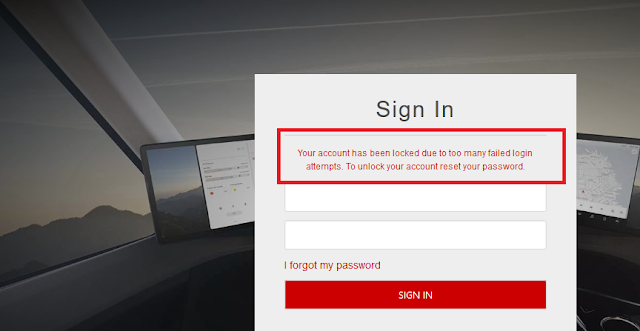
I noticed a design decision in Tesla’s login flow that is intentional but carries insecure design risk. When I entered my email and tried invalid passwords several times, Tesla locked the account and required a password reset to unlock it.
Locking an account after repeated failed logins is standard and sensible — it’s how you blunt brute-force and credential-stuffing attacks. The usual implementation is a temporary lock: the account cools down for a few minutes and then unlocks itself, so a legitimate user is only briefly inconvenienced.
Tesla’s version didn’t cool down on its own. It required the user to go through password reset to get back in.
Why it’s risky
The problem is that this response can be triggered by anyone, against any account, using only the victim’s email address:
- An attacker enters a target’s email and submits invalid passwords repeatedly (say, 20–30 attempts).
- After enough failures, Tesla locks that account.
- When the real user later tries to log in with their correct credentials, they’re told to reset their password.
So an attacker who never knew the password can still deny the legitimate owner access and force them through recovery. This is a denial-of-service against the account — and there’s a sharper edge: if the victim no longer controls the email tied to their Tesla account, the forced reset can leave them unable to recover it at all.
How it scales
The risk compounds when combined with email enumeration. If an attacker can first confirm which email addresses belong to Tesla accounts, they can then lock those accounts in bulk — forcing a large number of users into password resets at once. A nuisance against one account becomes a systemic harassment or disruption vector across many.
(This is a good illustration of why enumeration, harmless-looking on its own, matters: it turns a one-off annoyance into something that scales.)
A safer design
The fix is to keep the protection but change the unlock path:
- Prefer temporary, self-expiring lockouts over forced password resets, so a legitimate user regains access after a cooldown without being pushed through recovery.
- Add progressive delays and rate limiting on failed attempts, and a CAPTCHA, to slow brute-force without a hard lock that an attacker can weaponise.
- Don’t reveal account validity in the process (generic messaging), so lockouts can’t double as confirmation that an account exists.
- Consider lockout thresholds that target the source (IP/device/velocity) rather than only the account, so an attacker can’t lock an account they don’t control simply by failing to log into it.
The underlying principle: a security control shouldn’t be usable as a tool against the very users it’s meant to protect.
Thanks for reading — happy hacking!

Leave a Reply